 Income tax
Income report
Find here all information about your investment Income Report, including deadlines, data contained in the document, and step-by-step guidance to correctly complete your Income Tax declaration.
Frequently asked questions about the income report
The Income Report for investment funds is a document that details your assets and the earnings obtained from your fund shares throughout the year.
The deadline to submit the Individual Income Tax Return (DIRPF) for 2025 is the last business day of May.
- Payer information: the entity responsible for withholding income tax;
- Beneficiary information: investor data;
- Tax-exempt income: amounts received without income tax incidence;
- Income subject to exclusive taxation: profits already received net of taxes, meaning tax was withheld before funds reached your account;
- Net income: investment earnings obtained during the year minus taxes;
- Pending credits: financial operations carried out at the end of 2025 but settled only in the first days of 2026.
If this is your first time and you have never filed an income tax return before, QI Tech is here to help! Open your Income Report (check items 8, 9, 10, or 13 if you do not have it yet) and access the Brazilian Federal Revenue Service website.
You will have the option to download the application or complete your filing online. Items 6 and 7 will guide you step by step if you have questions during the completion process.
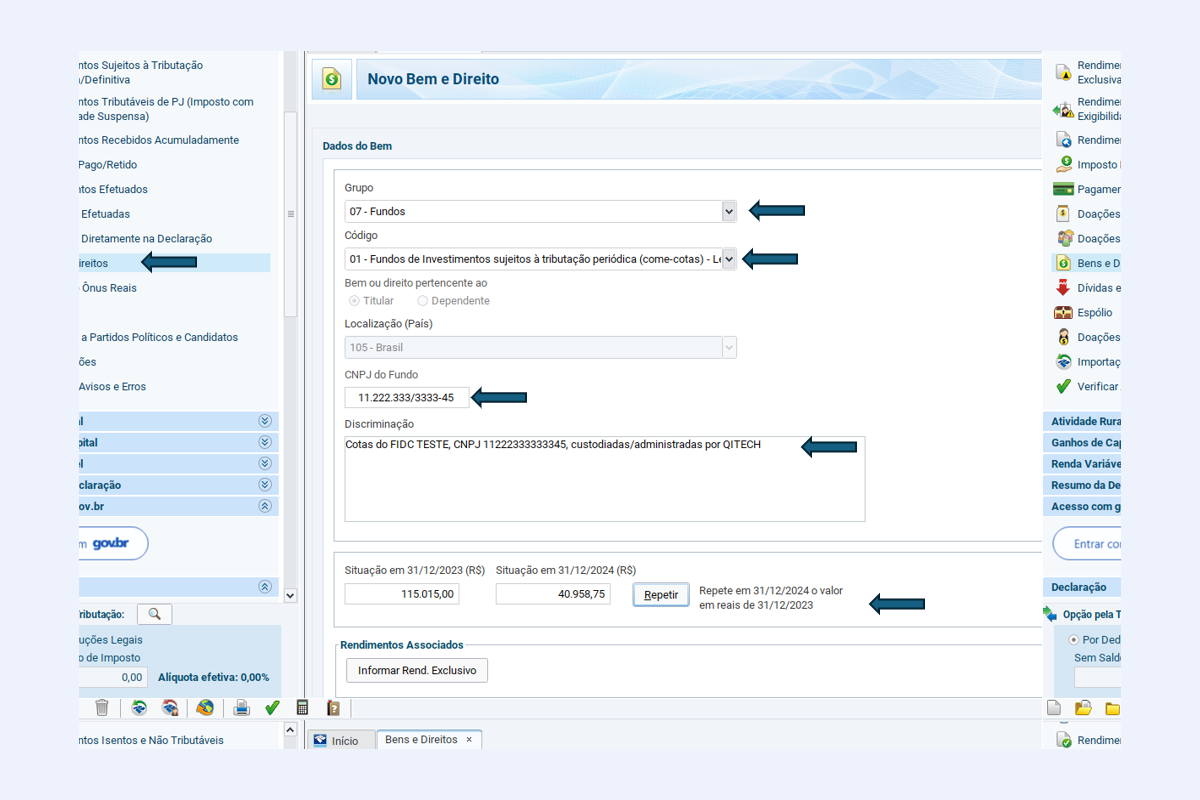
You must report ownership of your fund shares under the Assets and Rights section.
- Select Group 07 – Funds;
- Choose the correct Code according to the fund type indicated in the Income Report;
- In the Description field, include the fund name, number of shares, and the brokerage where they are held;
- Enter the Fund’s CNPJ (available in the report);
- Complete the fields:
- "Situation on 12/31/2024" — value declared in the previous year;
- "Situation on 12/31/2025" — acquisition cost (amount paid), never the current market value.
Important notes:
- Come-cotas: even without redemption, taxable income may occur due to semiannual taxation (May and November). This amount appears in your report and must be declared under Exclusive Taxation;
- Zero balance: if you fully redeemed a fund during 2025, the "Situation on 12/31/2025" will be R$ 0.00, but earnings must still be declared;
- The 12/31/2025 balance is calculated as follows:
- Funds without come-cotas: number of shares on 12/31/2025 × share value on application date(s);
- Funds with come-cotas, redemption, or amortization: number of shares on 12/31/2025 × last taxed share value.
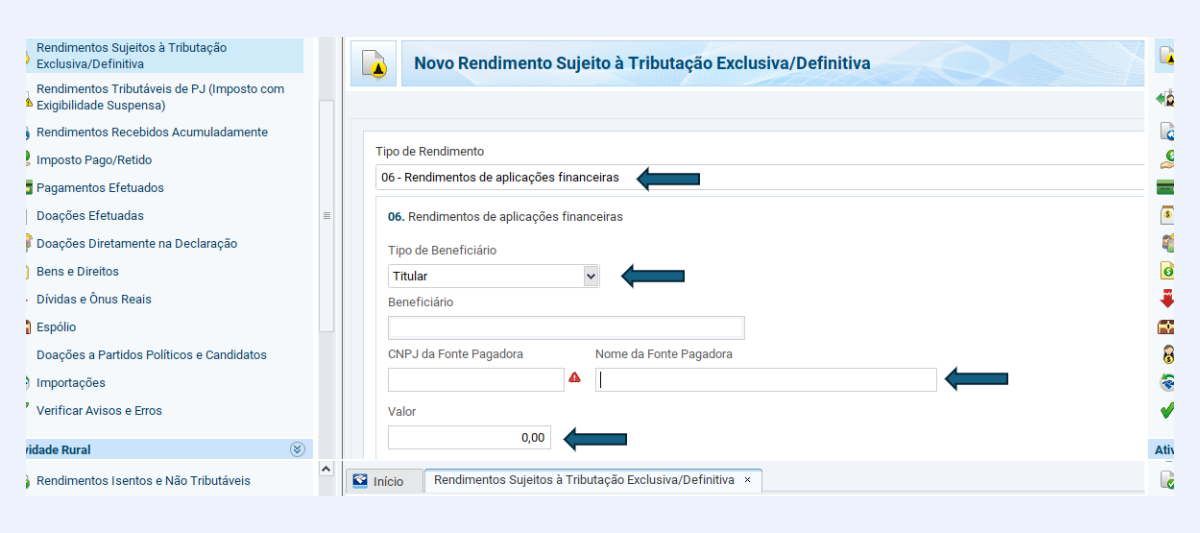
This is where you report income generated by the fund, whether through redemption or come-cotas taxation. Since tax is withheld at source, no additional payment is required now. Go to the Exclusive/Definitive Taxation Income section.
- Select Code 06 (Financial Investment Income);
- Enter the payer’s CNPJ (brokerage or fund administrator) and the net amount received during the year.
If you invest in Real Estate Investment Funds (FIIs) or Agro-industrial Investment Funds (FIAGROs), reporting differs slightly because monthly dividends are generally tax-exempt:
- Income type: 09 – Others;
- Beneficiary type: holder;
- Payer CNPJ: the CNPJ of the fund distributing dividends;
- Payer name: fund name;
- Description: "Monthly income from FII [Fund Code – e.g., HHLG11]";
- Amount: total received during 2025.
The Income Report will be sent to your email by February 28 with the subject line: “Income Report 2025 | QI Tech” as a password-protected PDF file.
To open the file, enter the password (the first six digits of the investor’s CPF/CNPJ without punctuation).
There are three ways to obtain the Income Report:
- Email: the report was sent as a password-protected PDF with the subject “Income Report 2025 | QI Tech” (check spam folder);
- Investor Portal: log in to the Investor Portal using your email and password, then select Income Report under Download Reports;
- Support channel: request the document via email atendimento.investidor@qitech.com.br or WhatsApp +55 (11) 2827-3725.
If you did not receive your report by email, you may request it via atendimento.investidor@qitech.com.br or WhatsApp +55 (11) 2827-3725.
To request access to the Investor Portal, contact atendimento.investidor@qitech.com.br or WhatsApp +55 (11) 2827-3725, informing your full name, CPF, and email.
To recover your login information, access the Investor Portal and click “Forgot my password”. A link will be sent to your registered email to create a new password.
If you no longer have access, request assistance via atendimento.investidor@qitech.com.br or WhatsApp +55(11)28273725.
The Income Report will be sent to your email by February 28 with the subject “Income Report 2025 | QI Tech” as a password-protected PDF file. If you did not receive it, request it via atendimento.investidor@qitech.com.br or WhatsApp +55(11)28273725.